
Agent Studio
Give recurring questions a shared starting point.
Create an assistant around a defined set of tables. Review its data map, add business rules and save verified answers or completed builds. Your team can reuse that context instead of explaining the same data from the beginning.
- Up to 30 tables per agent
- Reviewed data maps
- Verified answers & saved builds
The workflow
Agent Studio, step by step.
-
Define the data it should know
Choose up to 30 tables from one project, the Data Repository and supported project connections. Project tables establish the agent’s work project.
-
Review the data map
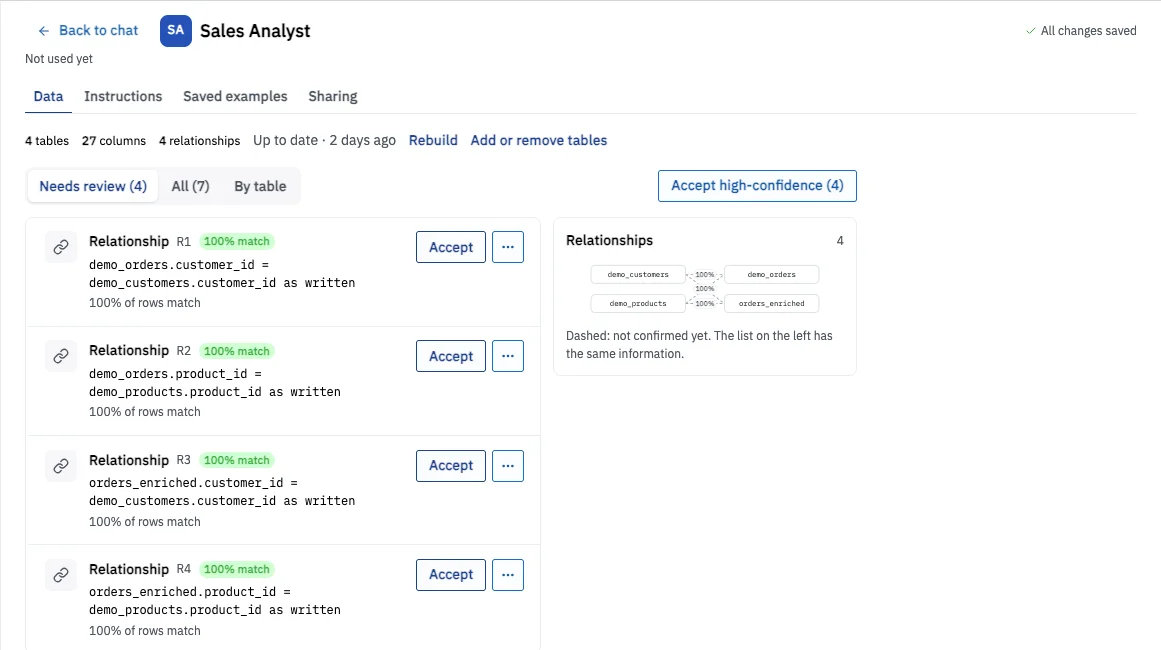
Inspect discovered columns, relationships and cleaning suggestions. Accept or correct assumptions so later questions have a clearer starting point.
-
Add rules and useful examples
Set instructions for business definitions and naming. Save a checked SQL answer as a verified example, or keep a finished pipeline build for similar requests.
-
Ask, build and share deliberately
Ask reads the agent’s tables. Build proposes a pipeline in its work project for approval. Keep the agent private or share it with your division; each person still needs access to its data.
Capabilities
What makes the workflow work.
-
A data map you can inspect
DDL maps table structure, statistics, relationships and cleaning suggestions. Review unconfirmed assumptions, rebuild the map or change which tables belong to the agent.
-
Business instructions
Add metric definitions, naming conventions and rules such as when a reporting week begins. Instructions accompany future questions and builds.
-
Verified answers and saved builds
Keep a question with checked SQL, or the steps of a completed build. Similar requests can reuse examples instead of relying only on a fresh proposal.
-
A defined work project
Build adds pipeline nodes only to the agent’s work project and requires approval and edit access. Agents made only from Data Repository tables answer questions without builds.
-
Division sharing
Share an agent’s setup with your division without granting extra data access. Only owners or superadmins edit it; division members can keep personal examples.
-
Usage and cost visibility
Inspect recorded uses and cost for an agent. Administrators can review calls and cost by agent in AI Ops alongside the installation’s AI controls.
From overview to practice
Explore Agent Studio in the guide.
Walk through table selection, data-map review, instructions and saved examples. See how work projects and division sharing affect what an agent can read or build.
Open the Agent Studio guideConnected capabilities
Keep the work moving.
FAQ
A few things worth knowing.
- Does Agent Studio build dashboards?
- No. An agent’s Ask mode reads its tables, and Build proposes pipeline plans in its work project. To create or change a dashboard, leave the agent, choose general AI and use Ask in the AI Assistant.
- Does a shared agent give colleagues access to my tables?
- No. Each person uses the agent with their own DDL access. Tables they cannot open, and examples about those tables, are left out of their context. Sharing the agent is not sharing all its data.
- Can an agent run builds on its own?
- No. An agent proposes a pipeline plan for a person to approve. Building also requires a work project, permission to change that project and an AI access level that allows changes.
- What needs to be configured first?
- Agents are part of AI Assistant and require that service and its enabled AI features. Answers need a configured AI model; your administrator controls data policy and permitted changes.